
Sonder A native markdown editor for Mac
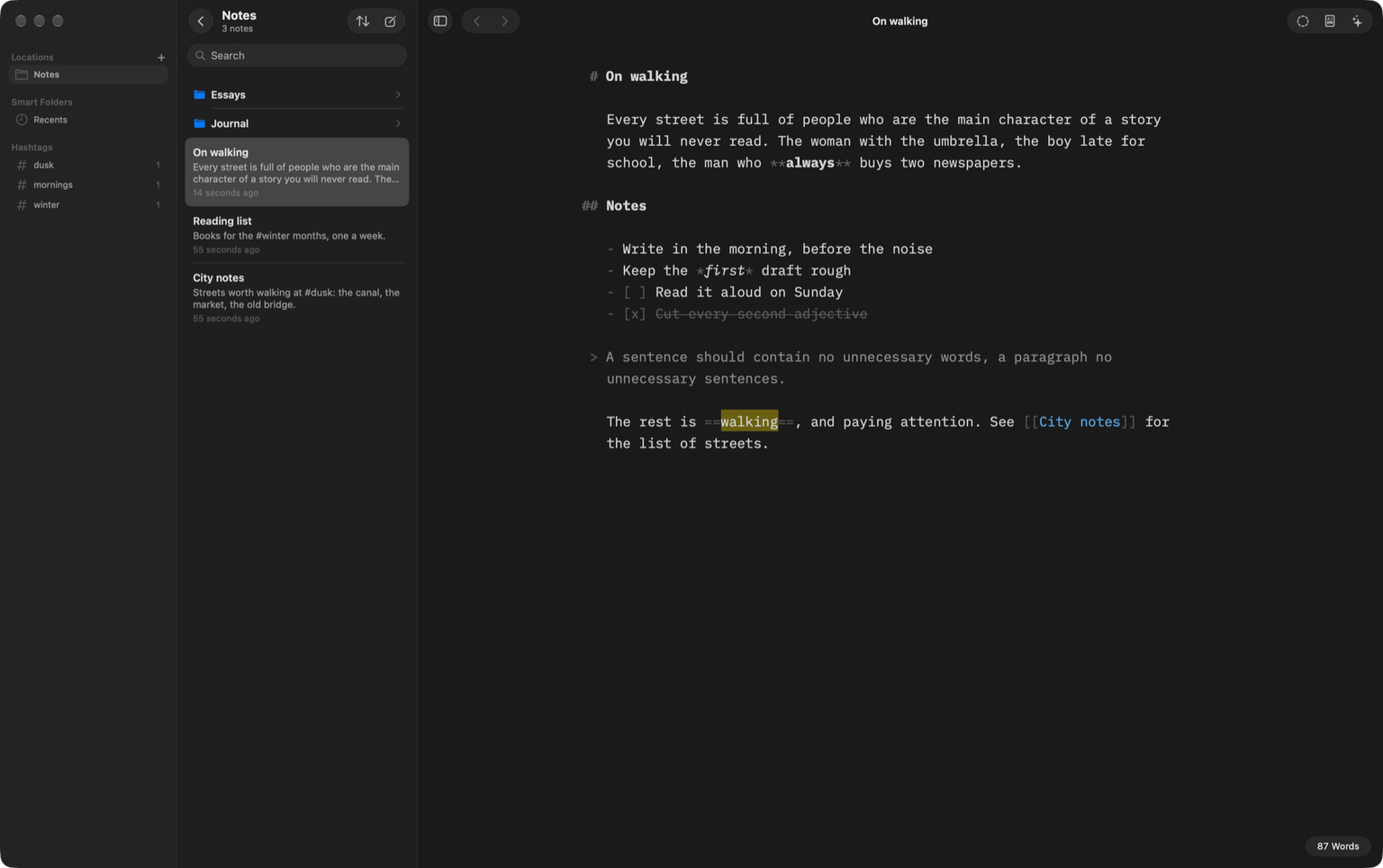
Sonder is a free, open-source markdown editor for Mac. It opens your own folder of .md files and gives you Focus Mode and the AI tools you already have.
Free and open source · macOS 14 or later · Apple silicon and Intel
Why I made it
I write a lot of notes. Books I'm reading, coffee recipes, random thoughts that won't leave me alone. All of it sits in one folder of markdown files, backed up with git. Most writing apps want you to move in: their database, their sync, their account. I just wanted a nice window on top of my folder.
So I built one. You point Sonder at a folder and it shows you what's in there. It doesn't copy anything into some library of its own or rename your files behind your back. Delete the app tomorrow and your notes are still sitting right where you left them.
Why the name? Ever sat on a train and thought about how every single person in that carriage has their own drama going on, just as big as yours? There's a word for that, sonder. I liked it for an app where you write your own story.
What it does
- Writing
- You still see the markdown, the stars and hashes are there, I just made them light gray so they don't scream at you. Headings are bold, and the # sits out in the margin. The font is IBM Plex (Mono, Duo or Quattro, pick one).
- Focus Mode
- Hit Command D and everything goes dim except the sentence you're typing, which stays in the middle of the screen. Sounds like a gimmick, I know. Try it on a messy paragraph.
- Library
- Your folders on the left, plus hashtags, favorites and saved searches. Command P opens a quick finder for notes and folders. If you have fzf installed it uses that, because fzf is just better at guessing what you meant.
- Preview and export
- Command R shows the rendered version. Tables work, footnotes work, task lists, even math. When you're done you can export to PDF, HTML or Word.
- Style Check
- It crosses out words like “basically” and “very” and the clichés we all lean on. It won't fix them for you though. That's your job.
- Bring your own AI
- I already pay for Claude Code. Paying again for some AI inside a notes app felt dumb. So Sonder talks to whatever you've got installed, Claude Code, Codex, Cursor, Gemini, Ollama, the list goes on. Ask it if a paragraph makes sense, or to fix your grammar. The answer waits in a side panel until you hit Insert. Anything it wrote is tagged as AI in the file, which is nice six months later when you can't remember who wrote that line, you or the robot.
- Native
- SwiftUI and TextKit, the stuff Apple builds its own apps with. No Electron. It opens instantly and scrolls like a Mac app should, and on macOS 26 it gets the Liquid Glass look for free.
Get it
Download the DMG, open it and drag Sonder into Applications. It's signed and notarized by Apple, so it just opens. Works on any Mac with macOS 14 or newer.
It's still early, version 0.1.1. What changes in each update goes on the releases page (opens in a new tab), and the code is on GitHub (opens in a new tab) if you'd rather build it yourself.
Questions
Is Sonder free?
Yes. Free, and the code is up on GitHub under the MIT license.
Can I use my existing notes?
Probably! Obsidian vaults are plain .md files under the hood, so those open fine. A git repo or some folder in iCloud Drive works too.
Does it sync?
Nope, not by itself. I keep my notes in a private GitHub repo. Put yours in iCloud Drive or Dropbox if you'd rather, Sonder really doesn't mind.
Do my notes get sent to an AI?
Only the text you ask about, and only when you ask. It goes to the tool you picked, the same way it would if you ran that tool in your terminal. There's no Sonder server, and it doesn't store any API keys.
Which Macs does it run on?
Anything on macOS 14 Sonoma or newer, Apple silicon or Intel.
How do I install it?
Download the DMG, open it and drag Sonder into Applications. That's it. It's signed and notarized by Apple, so your Mac won't complain.
Also made by me
If you spend your days in databases too, Postquel is a native PostgreSQL client for Mac that works the same way, with your own AI. The rest is on the products page, and there's a bit more about me on the home page.